Planned Obsolescence, Software Edition: How Firmware Updates Are Quietly Throttling Your Older Devices
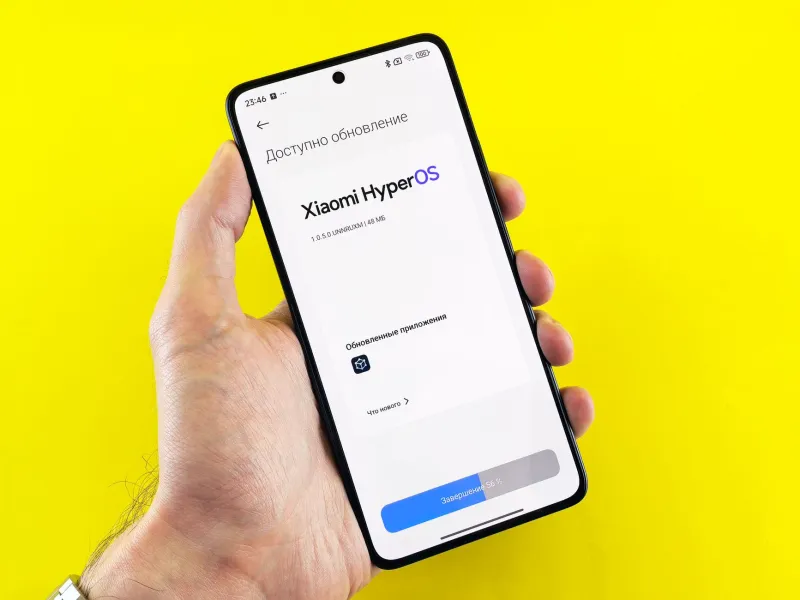
When your two-year-old smartphone starts feeling sluggish after a routine software update, the instinct is to blame aging hardware. The processor is getting old. Storage is filling up. That explanation is comfortable, and for manufacturers, it is also enormously convenient. The reality, however, is considerably more complicated — and in some documented cases, deliberately engineered.
A growing body of evidence suggests that firmware and operating system updates can systematically reduce the performance of older devices. The mechanisms are technical, the paper trails are thin, and the financial incentives for manufacturers are substantial. For American consumers who collectively spend hundreds of billions of dollars on consumer electronics annually, understanding this dynamic is not a matter of curiosity — it is a matter of financial self-defense.
The Case That Changed the Conversation
No discussion of software-driven performance throttling is complete without revisiting Apple's 2017 "batterygate" episode. Following widespread user complaints and independent benchmarking by Primate Labs — the developer behind the Geekbench performance testing tool — Apple confirmed that iOS updates had been deliberately reducing CPU performance on older iPhone models, including the iPhone 6, 6S, and 7.
Apple's stated rationale was battery health management: aging lithium-ion batteries struggle to deliver peak current, and uncapped processor demands can cause unexpected shutdowns. Throttling performance, the company argued, was a protective measure. Critics countered that Apple had implemented the change silently, without user notification or consent, and that the practical effect — a noticeably slower device — created a powerful commercial incentive to upgrade.
The fallout was significant. Apple faced multiple class-action lawsuits and paid out a $500 million settlement in the United States. The company subsequently introduced a Battery Health dashboard in iOS, giving users visibility into their battery's condition and the option to disable performance management. It was a meaningful transparency concession — but it arrived only after the practice had been exposed by outside researchers, not disclosed proactively by Apple itself.
Beyond Apple: A Broader Pattern
It would be a mistake to treat the Apple case as an isolated incident confined to one company or one product category. Similar patterns have been observed — with varying degrees of documentation — across the broader consumer technology landscape.
Android device manufacturers face analogous pressures. As Google releases new versions of Android, older hardware must run increasingly resource-intensive operating environments. While Google itself does not have the same direct hardware sales incentive that Apple does, third-party Android manufacturers — Samsung, OnePlus, and others — have faced scrutiny over how aggressively their custom Android skins consume resources on aging devices. Samsung, in particular, has faced criticism in the European Union over software update policies that critics argue effectively shorten device lifespans.
The PC market is not immune, either. Windows 11's much-publicized hardware requirements — specifically its TPM 2.0 and processor compatibility restrictions — effectively rendered millions of otherwise functional machines ineligible for Microsoft's latest operating system. Independent performance analyses have shown that certain Windows 10 updates introduced additional background processes and telemetry services that measurably increased CPU and memory utilization on older hardware configurations.
The Technical Mechanisms at Work
Understanding how software updates degrade performance requires a brief examination of the underlying mechanics. There are several distinct pathways through which this can occur, not all of which involve deliberate intent.
Resource creep is perhaps the most common and least controversial mechanism. Each successive operating system version typically introduces new features, expanded security protocols, and additional background services. These additions consume processor cycles, RAM, and storage I/O — resources that a three-year-old device has in fixed supply. The device is not being throttled in any targeted sense; it is simply being asked to run software designed with newer hardware in mind.
Battery-linked CPU throttling, as documented in the Apple case, represents a more deliberate intervention. The operating system monitors battery health metrics and scales processor performance accordingly. This is technically defensible as a stability measure, but its commercial implications are difficult to separate from its functional ones.
Deprioritized optimization is subtler and harder to prove. When engineers optimize software performance, they inevitably focus their efforts on current and near-current hardware. Older chips may receive less attention in compiler tuning, driver updates, and graphics rendering pipelines. The result is a widening performance gap that, while not the product of active throttling, is also not entirely accidental.
How to Monitor Your Own Device
The most effective defense against software-driven performance degradation is measurement. If you establish performance baselines before and after major updates, you gain objective data rather than subjective impressions.
For smartphone users, Geekbench 6 (available for both iOS and Android) remains the most widely referenced cross-platform benchmarking tool. Run a full benchmark before installing a significant OS update, record your scores, and repeat the test afterward. Consistent multi-core scores indicate stable performance; a meaningful drop — particularly in CPU-bound tasks — warrants investigation. On iOS, navigate to Settings > Battery > Battery Health & Charging to review your battery's maximum capacity and check whether performance management is active.
For Windows PC users, the built-in Performance Monitor (accessible by searching "perfmon" in the Start menu) provides granular visibility into CPU utilization, memory consumption, and disk I/O over time. Task Manager's Startup tab is worth reviewing after major updates, as new background services can be added without prominent notification. Third-party tools such as HWiNFO64 offer more detailed hardware telemetry, including CPU clock speed monitoring that can reveal whether throttling is occurring under sustained load.
For Mac users, the Activity Monitor application provides a real-time view of system resource consumption. The "Energy" tab is particularly informative for understanding which processes are driving power draw and, by extension, potentially triggering thermal or battery-linked performance constraints.
Keeping a simple log — even a spreadsheet with benchmark scores and update version numbers — over a 12-to-18-month period can reveal trends that would otherwise remain invisible.
The Regulatory and Transparency Gap
The United States currently lacks comprehensive federal legislation specifically addressing software-driven device performance management. The Federal Trade Commission has broad authority over deceptive trade practices, and the Apple settlement demonstrated that courts are willing to treat undisclosed throttling as actionable. However, the evidentiary bar for proving deliberate, commercially motivated performance degradation — as opposed to the routine resource demands of new software — remains high.
The European Union has moved further, with its Ecodesign Regulation establishing requirements for software update availability and device longevity. American consumer advocates have called for similar measures domestically, but meaningful legislative progress has been slow.
In the absence of regulatory mandates, the practical burden falls on informed consumers. Manufacturers will not voluntarily subject their update practices to independent performance audits. The tools to conduct those audits, however, are freely available — and using them consistently is the clearest way to determine whether your device's declining performance reflects aging hardware, or a software environment that has quietly moved on without you.
The Bottom Line
Software updates are, in the vast majority of cases, genuinely beneficial — delivering security patches, feature improvements, and stability fixes that users need. The problem is not updates themselves, but the absence of transparency around their performance implications for older hardware. Until manufacturers are required to disclose how each major update affects device performance across supported hardware generations, the responsibility for monitoring that impact rests with users. Measure your devices. Document your baselines. And when the numbers shift after an update you did not request, ask why.